





Make quick, easy payments with your mobile wallet.
Add your cards to your mobile wallet for fast and convenient transactions in stores, online and in apps.1

What is mobile wallet?
A mobile wallet is an app that allows you to store digital versions of your credit and debit cards, which can then be used to make virtual and contactless payments. Use your mobile wallet to make purchases in stores, online, and in apps with your smartphone or tablet.
Apple Pay™
Apple Pay is available to use in your Apple Wallet on Apple devices, such as iPhone, Apple Watch, or iPad.
Samsung Pay™
Samsung Pay is available to use in your Samsung Wallet on Samsung Galaxy smartphones and smartwatches.
Google Pay®
Google Pay is available to use in your Google Wallet on most Android smartphones, tablets, and smartwatches.
Learn how to add your Hancock Whitney debit card from the mobile app.
Why use
mobile wallet?
Mobile wallets provide several benefits and features that make them a safe, convenient alternative to physical cash and cards.
Contactless payments
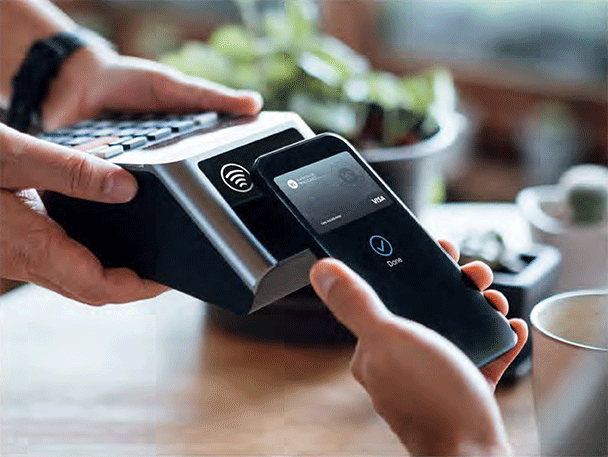
Simply "tap" your phone or smartwatch at a merchant's terminal to pay for a transaction. No physical card required.
Enhanced security
Mobile wallets replace your actual card information with unique digital tokens, so merchants never see your actual account information. Mobile wallets can also require biometric authentication to unlock, such as facial recognition or fingerprint ID.
Digital assets
In addition to your credit and debit cards, most mobile wallets can also store things like airline boarding passes, event tickets, and park passes, saving you the hassle of physical documents.
How do mobile wallets work?
To use a mobile wallet, you first add an eligible debit or credit card to the wallet app and complete any required verification.
When you need to checkout, simply hold your device near a contactless payment terminal or select the mobile wallet during online or in-app purchases. The wallet app then uses encryption to replace your actual card number with a unique digital token, which protects your account information during the transaction. Payment is processed through the same secure payment networks used for traditional card transactions.
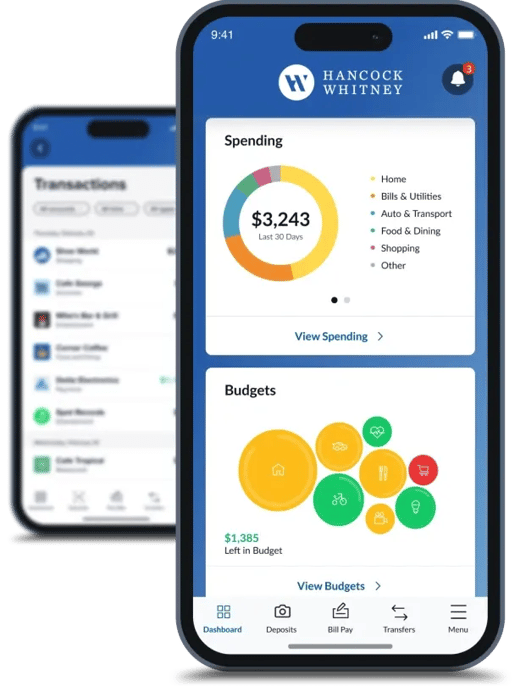
Bank where you want, when you want with our mobile app.
Our mobile app is packed with powerful features that make it easier to take control of your money.
Transaction Translator
Get a clearer picture of your finances with enhanced display features that automatically categorize transactions.
Debit Card Controls
Use debit card controls to turn your Hancock Whitney debit card on/off, change your PIN, limit debit card transactions based on specific criteria, and stay informed with alerts.2
Link All Your Accounts
Securely add all your Hancock Whitney accounts, plus your external accounts, so you can see your full financial picture in one place.
Budgeting Tools
Create budgets, track spending, and get easy-to-understand strategies to help build better financial habits.
Want to explore more of our digital banking features?
Frequently asked questions about mobile wallet
-
Is mobile wallet secure?
Mobile wallet is typically safer than carrying physical credit or debit cards. When you make a mobile wallet payment, a unique code is sent to the payment terminal instead of your card details. And since most phones can’t be operated without a fingerprint ID or personal identification number, getting card information off your phone is more difficult for bad actors than opening a wallet.
-
Where can I use mobile wallet?
Look for the contactless reader icon on card readers and point-of-sale terminals.
-
Can I use my Hancock Whitney credit or debit cards with mobile wallet?
Your Hancock Whitney credit and debit cards will work with Apple Pay, Google Pay, and Samsung Pay.
-
Is mobile wallet free to use?
Mobile wallet is free, but data charges from your mobile carrier may apply.
-
Will I still get rewards points on my Hancock Whitney credit card when I use it through Mobile Wallet?
You will still earn rewards points and enjoy all the great benefits and security features that come with your Hancock Whitney credit cards, including Visa Zero Liability coverage.
-
Where can I find more information about Apple Pay, Google Pay or Samsung Pay?
Visit the Apple Pay Support Page.
Visit the Google Pay Support Page.
Visit the Samsung Pay Support Page. -
How do I remove a card from my mobile wallet?
You can remove a card from your mobile wallet at any time by opening your wallet app, selecting the card, and choosing the option to remove or delete it. Removing a card from your mobile wallet does not close your account or cancel the physical debit or credit card—it only removes the digital version from the mobile wallet app.
-
If I get a new debit card, do I need to update my mobile wallet?
Yes, you'll typically need to update your mobile wallet when you receive a new debit card, especially if the card number or expiration date has changed. Some card replacements may update automatically, but if your card stops working via the mobile wallet, simply remove the old card and add the new one.
-
Can I use a mobile wallet while traveling?
Yes, you can use your mobile wallet while traveling anywhere contactless payments are accepted. Before your trip, make sure your eligible cards are added to your mobile wallet and consider notifying your bank of your travel plans, just to be safe.
-
What happens with my mobile wallet if I lose my phone?
If you lose your smartphone, your payment information remains protected because your mobile wallet requires device authentication, such as a passcode, fingerprint, or facial recognition, to authorize purchases. You should lock or erase your device using your phone's remote security features and contact all of your card issuers if you believe your account information is at risk.
-
Can I have multiple Hancock Whitney cards in my mobile wallet?
Yes, you can add multiple Hancock Whitney debit and credit cards to your mobile wallet. You can choose a default card for everyday purchases and switch between your saved cards before completing a transaction.
-
Where on my phone is my mobile wallet?
Most smartphones include a built-in mobile wallet app that comes preinstalled on the device. Either look for your wallet app in your app library or home screen or search your phone for "wallet" if you don't see it.
Additional digital banking resources
1 Mobile Wallet: Check with your mobile provider regarding message, data rates and usage charges that may apply. While you can link your Hancock Whitney Bank debit and credit cards to any of these convenient payment options, we are not affiliated with nor do we endorse a specific wallet option. If you have any questions about a specific mobile wallet, please contact the payment provider directly.
2 Card Controls are not available in the business banking mobile app.
Zelle® and the Zelle® related marks are wholly owned by Early Warning Services, LLC and are used herein under license.
To send or receive money with Zelle®, both parties must have an eligible checking or savings account. Transactions between enrolled users typically occur in minutes. Only send money to people you know well and trust. If you don’t know the person you are paying or are unsure you will receive what you are purchasing, then we don’t recommend you use Zelle® for the transaction. Please be aware that neither Hancock Whitney nor Zelle® offers purchase protection for payments made with Zelle®. This means that if you don’t receive the item you paid for, or if it’s not as described, you may not be able to recover your funds.
Apple Pay is a trademark of Apple Inc.
Samsung Pay is a trademark or registered trademark of Samsung Electronics, Co., Ltd.
Android, Google Pay, and Google Play are trademarks of Google Inc., registered in the U.S. and other countries.